AEO Checklist for WordPress Blogs: Schema & Structure

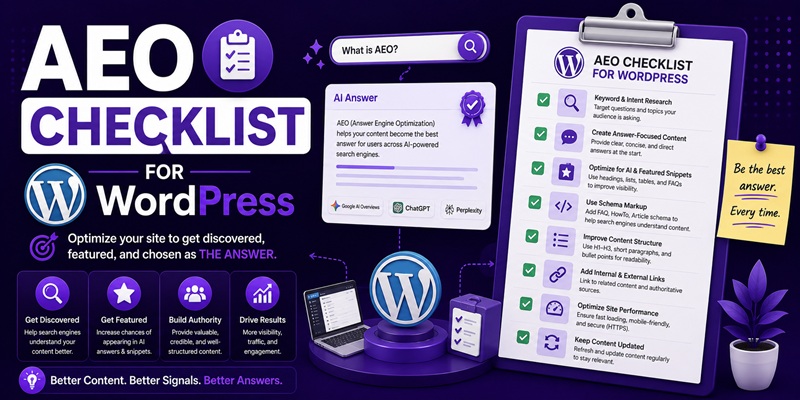
A working AEO checklist for a WordPress blog has four layers: confirm what your SEO plugin already generates for you (Article, Organization, and Breadcrumb schema), fix what only the writing can fix (a direct-answer opening and a heading structure a machine can parse), run a short list of settings once at the site level, and run a shorter list on every new post. Skip anything built for a rich result Google no longer shows, like FAQ or HowTo schema. None of this guarantees an AI system will cite you. It just removes the reasons it can’t.
Checked on 2026-08-04. Schema support and how AI systems surface content change fast, sometimes inside a single quarter. Google has already retired rich results that older AEO checklists still tell readers to “add,” including FAQ rich results, removed from Google Search in 2026, and HowTo rich results, removed years earlier. Confirm current guidance against Google’s own structured-data documentation before you implement anything below rather than trusting this page, or any blog post, to still be accurate by the time you read it.
What your SEO plugin already handles
If you’re running Rank Math, Yoast, or a similar plugin, a chunk of this checklist is already done and re-doing it by hand just adds a second, competing schema block. Where this lives: the plugin’s global schema or SEO settings tab, checked once, plus fields it pulls automatically from every post you publish.
Most current SEO plugins generate Organization or WebSite schema from your site identity settings, Article schema populated from the post’s title, featured image, publish date, and author, and Breadcrumb schema from your permalink structure. You don’t write any of that markup by hand. Open the plugin’s schema settings once, confirm the site name, logo, and social profile links (sameAs) are filled in, and confirm Article schema is switched on for your post type. Which plugin generates which schema types differs enough to matter for a review site specifically; see Rank Math vs Yoast for how the two handle it differently.
What only the writing can fix
Schema tells a search or AI system what a page is, not whether the page is worth quoting. No plugin writes your direct-answer paragraph, decides which sentence the H2 beneath it should deliver on, or turns a rambling explanation into a definition an AI system can lift whole. That work happens in the post editor, one sentence at a time, and no setting toggles it on.
Two pieces of this site already own the mechanics in full, so this checklist won’t repeat them: how to write an answer-first opening paragraph covers exactly where the direct answer goes and how long it should run, and how to structure headings for AI extraction covers whether your H2s should be phrased as questions. Treat both as required reading before you touch the per-post checklist below; this section is the “why,” those two are the “how.”
Worth doing once, at the site level
A handful of items pay off once and don’t need repeating per post. Where: your plugin’s global schema settings, your theme’s site identity settings, and your author archive pages.
- Organization or WebSite schema: name, logo, and social links, filled in once in the plugin’s global tab, not per post.
- Author archive pages: if your plugin ties Person schema to author bios, make sure each author page actually has a bio, not a blank template, since an empty archive page defeats the point of the markup.
- Site identity: a clean title tag and a real favicon, both of which affect how consistently your brand name is recognized as an entity, separate from any single article.
- A one-time sweep confirming your plugin’s schema output validates cleanly, using Google’s own Rich Results Test rather than a third-party checker.
None of this is a monthly task. It’s a settings sweep, done once, then revisited only when you change plugins or themes.
The per-post checklist
This is the list to run every time you hit publish, in the post editor itself, not in a settings panel.
- One H1 that matches the exact phrase a reader would type or ask.
- A direct-answer paragraph inside the first 100 words, before any scene-setting.
- H2s that map to the actual sub-questions the post answers, not to generic labels like “Overview” or “More Info.”
- A short table or list wherever you’re comparing options, since that structure is easier for both readers and AI systems to parse than a paragraph of prose.
- The author and date fields filled in correctly, not left on a default admin account or an old publish date.
- One internal link to a page that extends the topic, so the post isn’t a dead end.
For the full mechanics behind the first three items, the two guides linked in the section above cover the opening paragraph and the heading structure in detail. This list is the “did I do it” pass, not the explanation.
What to deliberately skip in 2026
Skipping the wrong thing wastes an afternoon; skipping the right thing saves one. Two schema types show up on almost every AEO checklist still circulating and neither earns you anything in Google Search anymore. FAQ rich results stopped appearing in Google Search in 2026, and Google has been winding down the supporting documentation and tooling since. HowTo rich results were removed years earlier, in 2023. Both schema types are technically still valid markup under schema.org, and leaving existing FAQPage or HowTo markup on a page won’t break anything, but hand-coding new blocks of either one to chase a rich result that no longer exists is time spent on nothing. Keep writing FAQ sections and step-by-step instructions for readers and for AI systems, which parse the visible content directly. Just don’t budget time for the JSON-LD.
Also skip: running two schema plugins at once, since duplicate or conflicting markup is worse than none, and manually pasting a JSON-LD block into a text widget when your existing plugin already outputs the same schema type automatically.
How to confirm it’s actually working
A validator can only tell you the markup is well-formed, not that it’s persuasive. Google’s Rich Results Test confirms your schema parses. It cannot tell you whether ChatGPT, Perplexity, or Google’s AI Overviews are actually pulling from your page, because that’s a separate question with a separate method: checking your server logs and analytics for the crawlers and referral patterns that indicate a citation, not your schema settings. That diagnostic work is its own job and belongs to how to check if AI is citing your site, which walks through it in full. For the bigger picture of why any of this matters, what AEO actually is is the place to start if you haven’t already.
FAQ
Do I need a schema plugin if I’m already using Rank Math or Yoast?
No. Both generate the core schema types (Article, Organization, Breadcrumb) automatically from your existing settings and post fields. A second dedicated schema plugin usually just creates duplicate markup that competes with what your SEO plugin already outputs.
Is FAQ schema worth adding to a new post in 2026?
For a rich result specifically, no; Google removed FAQ rich results from Search in 2026. Writing an on-page FAQ section is still worth doing for readers and for AI systems that read the visible content, but the JSON-LD markup itself no longer buys you a search-result feature.
What’s the single highest-value item on this checklist?
The direct-answer paragraph in the first 100 words. It’s the one item no plugin can generate for you, and it’s the piece both AI Overviews and answer engines are most likely to extract or quote.
Do I need to redo this checklist for every old post, or only new ones?
The per-post section is meant for new posts going forward. Retrofitting older posts is a separate, larger project; start with your highest-traffic or most-linked posts rather than working through the archive in publish order.
Does any of this guarantee an AI system will cite my site?
No, and treat any source that claims otherwise with suspicion. This checklist removes technical and structural reasons your content might get skipped. Whether a specific AI system chooses to cite you on a specific query is outside your control and outside any checklist’s control.
