How to Test a Lifetime Deal Before the Refund Window Closes

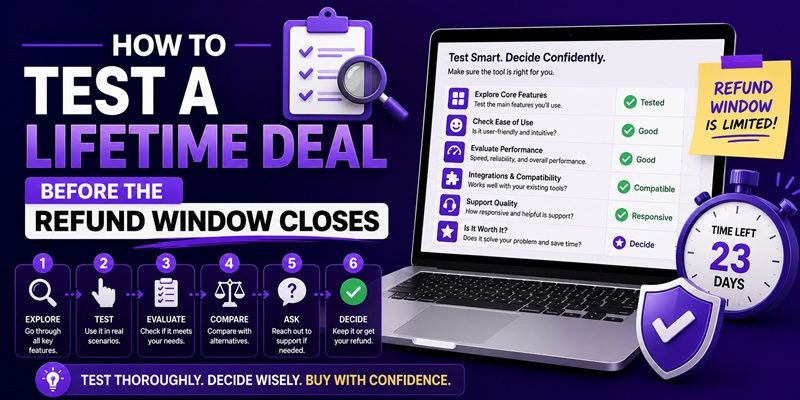
Split your refund window into thirds and treat each third as a checkpoint, not a deadline. In the first third, put the tool on real work. In the middle third, decide whether it’s earning a permanent place in your stack. In the final third, either commit or refund, with a hard calendar reminder several days before the window actually closes. This plan scales to whatever window a specific deal states, whether that’s 60 days, 30 days, or something else entirely, because the deal terms are what bind you, not a number this article assumes.
Checked on 2026-07-29: window length is set per deal, not fixed platform-wide, so confirm the specific number on the deal page before you build a testing timeline around it. What follows is scaled in thirds precisely so it holds up regardless of that number.
Why a testing plan matters more than a reminder
Most advice on refund windows amounts to “don’t forget to decide before it closes,” which is true but not useful on its own. The actual failure mode isn’t forgetting the deadline exists, it’s spending the whole window in a vague, low-effort trial and reaching the last few days with no real answer to whether the tool works for you. A plan with checkpoints forces an honest answer earlier, while there’s still time to act on it either way.
First third: what “real use” needs to include
The first phase of the window is not for browsing the interface. It’s for putting the tool on work you would have done anyway, using your actual data, not a demo project.
A few things that count as real use, and a few that don’t:
- Counts: running the tool against a live task on your own site, importing your actual content or keyword list, using it inside your normal workflow for at least a few sessions spread across different days.
- Doesn’t count: clicking through the onboarding tour once, testing it on a throwaway sample project, or opening it once and leaving it idle for three weeks.
The goal by the end of this phase is a specific answer to a specific question: did this tool do the job you bought it for, on your actual work, at least once? If you can’t answer that yet, you haven’t started the test.
Middle third: the decision checkpoint
This is where most guides suggest a single mid-window reminder, and that’s a reasonable minimum, but treat it as a decision point, not just a notification. By this checkpoint, ask three questions directly:
- Did it do the job on real work, more than once? A single successful run can be luck or a favorable edge case. Repeated success across different tasks is a better signal.
- Does it hold up against the red flags checklist? This is also the point to check the changelog, the founder’s activity in the deal comments, and whether support answered a real question if you sent one.
- Would I miss it if it disappeared tomorrow? If the honest answer is no, that’s your answer regardless of how many days remain.
If all three point toward keeping it, move into the final third as a formality. If any of them are shaky, use the remaining time deliberately to resolve the doubt rather than letting it drift.
Final third: the hard deadline, and how to not miss it
Set your own internal deadline several days before the actual window closes, not on the last day. A few days of buffer accounts for weekends, a busy week, or a support question that needs a reply before you can decide. Waiting until the literal final day removes any margin for the tool being briefly inaccessible, for a refund request that needs a follow-up, or for you simply forgetting because life got in the way.
If you’ve reached this phase and you’re still unsure, that uncertainty is itself useful information. A tool you can’t confidently say you’d miss after this much real use is a tool you were probably not going to keep past the deal’s novelty anyway. The mechanics of actually requesting the refund, what qualifies, how the money comes back, and the exceptions that don’t qualify, are covered in full in the AppSumo refund policy walkthrough. This article is about using the time; that one is about the fine print of the guarantee itself.
What to do differently if the window is 30 days, not 60
Not every deal runs the same length, and a 30-day window compresses everything above. The thirds are still the right structure, but each phase gets roughly half the calendar time: about ten days for real use, ten more for the decision checkpoint, and the final ten with your internal deadline set a few days before the actual close, not on day 29. The discipline that matters most in a shorter window is starting on day one. A 30-day guarantee gives you almost no room to recover from a slow start the way a 60-day window does.
Whatever the length, the underlying survival question this whole exercise sits inside doesn’t change: a refund window protects one transaction, for one decision, inside one deadline. It says nothing about whether the company will still exist next year. That broader question is covered in the lifetime deal framework, and it’s worth reading alongside this plan, not instead of it.
FAQ
How long is the typical refund window on a lifetime deal?
It varies by deal and by marketplace. Some run 60 days, some run 30, and the number that actually binds you is the one printed on that specific listing’s terms, not a general figure. Confirm it on the deal page before building a testing plan around it.
What counts as “really testing” a tool during the refund window?
Using it on real work you would have done anyway, across more than one session, ideally spread over different days rather than one long sitting. A single quick trial or an idle account for most of the window doesn’t give you a reliable answer.
When should I set my own decision deadline?
Several days before the actual window closes, not on the last day. This buffer protects you from a busy week, a support question that needs a reply, or simply running out of time to act on your own decision.
What should I check at the midpoint of my refund window?
Whether the tool has done the job on real work more than once, whether the vendor passes the basic red-flags check (active changelog, reachable founder, responsive support), and honestly, whether you’d miss the tool if it disappeared tomorrow.
Does a shorter refund window change how I should test?
Yes. A 30-day window gives you roughly half the calendar time of a 60-day one, so start testing on day one rather than easing in, and set your internal deadline earlier relative to the shorter total.
